The video introduces a new price upload feature on the Cabinetry.Online platform, allowing users to update their pricing on mass using a CSV file.
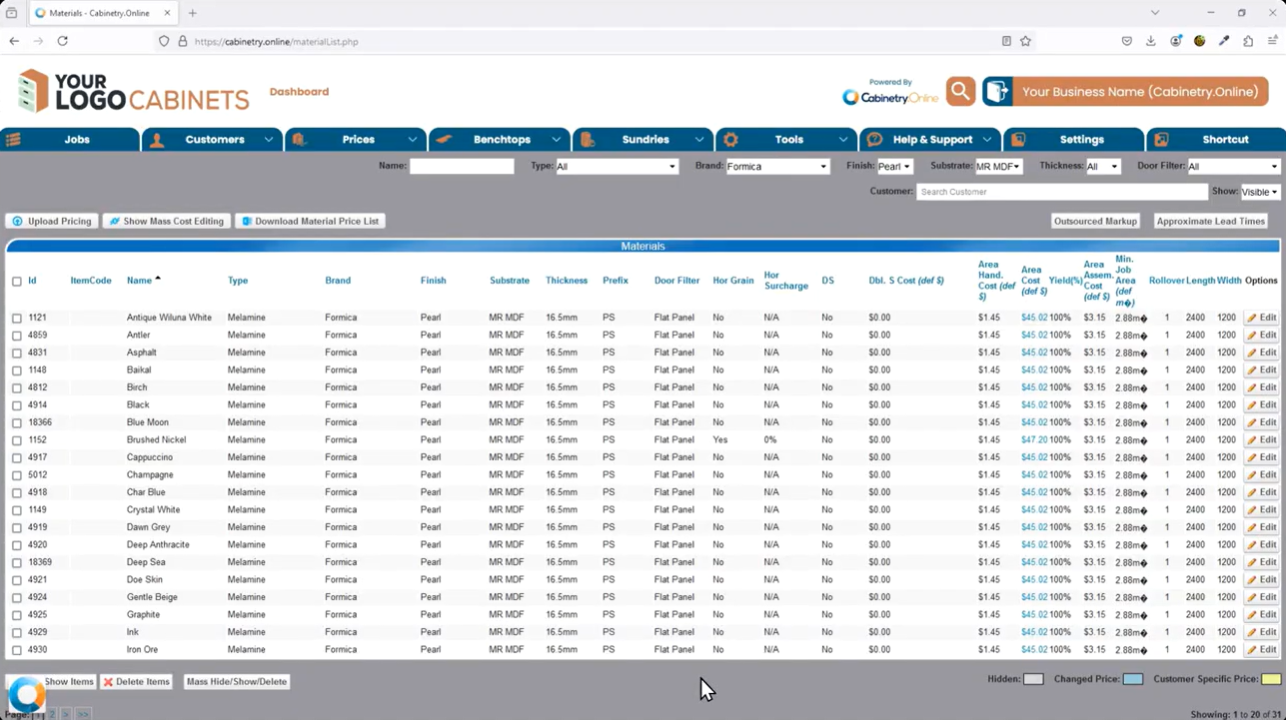
Upload Pricing Feature: A new "Upload Pricing" button on the portal allows users to update pricing on mass using a CSV file.
CSV Format & Database IDs: Users must first click "Download Price List" to generate a CSV file in the required format. The database relies on item IDs, so the file structure must be maintained, with changes made only to pricing fields.23
Modifiable Fields: Beyond pricing, users can also update the length and width of materials.4
Data Backup: Because uploading will overwrite existing database records, downloading a backup before uploading new data is highly recommended.5
Upload Process: Users select their updated CSV file, acknowledge the confirmation prompt warning that existing data will be overwritten, and proceed with the upload. The system then updates the records automatically.
Click the below image:
Was this article helpful?
That’s Great!
Thank you for your feedback
Sorry! We couldn't be helpful
Thank you for your feedback
Feedback sent
We appreciate your effort and will try to fix the article