This video explains how to process a customer's submitted order and access cost and workflow options. The video also explains the job processing stages, how to add freight fees, product-specific charges, additional material variations, or adjust usage fees.
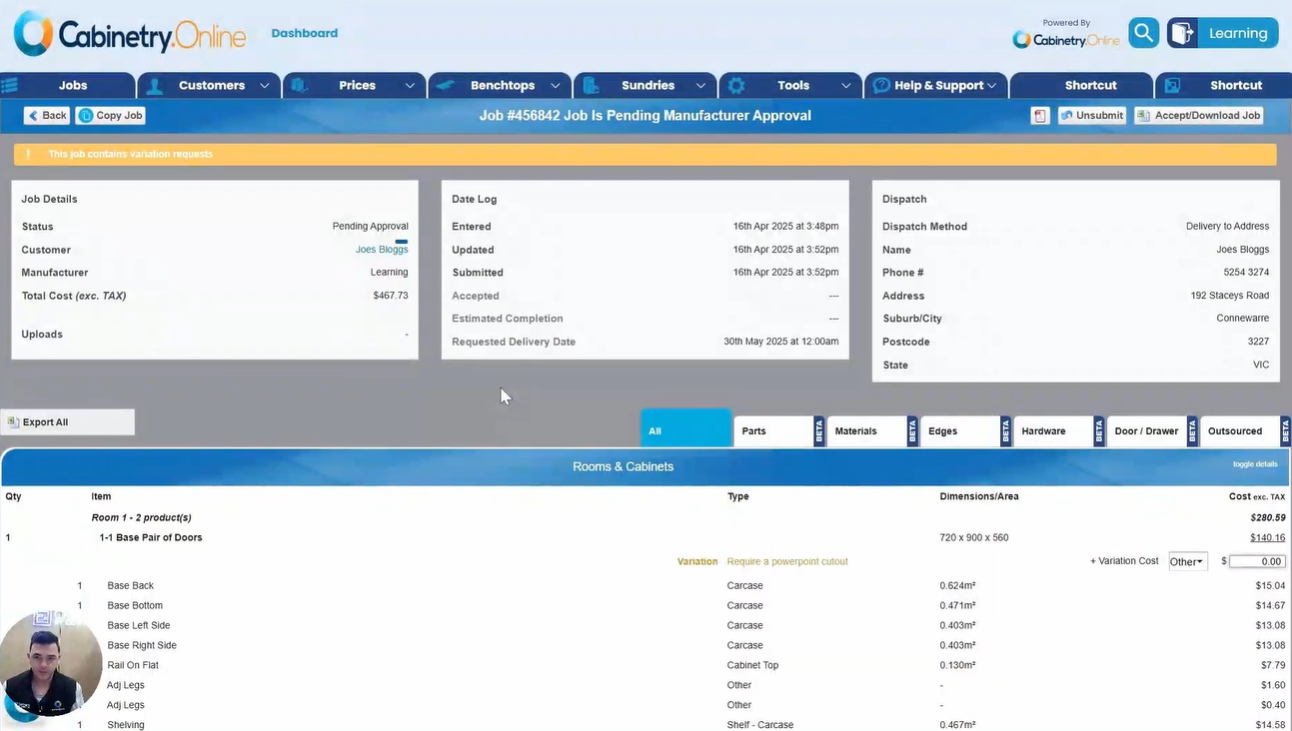
- Initial Approval & Options: When a job is in "pending approval," select "Accept and download job" to view options for progressing the order, including editing costs, approving after payment received, requiring payment before production, or moving directly to production.1
- Editing Job Costs: In the "edit cost" dashboard, you can add freight charges, product-specific variations (such as cutout fees), and custom overall job variations, with an option to make charges removable by the customer.2
- Minimum Usage & Customer Confirmation: Minimum usage fees can be updated or deleted, and the job can be sent back to the customer to confirm added costs before proceeding.
- Customer Communication: Users can customize and generate email notifications to inform customers of updates or ask questions.
- Managing Payment Status: Accepting the job moves it to "pending payment," where it can then be marked as "payment received," moved into production without payment, or unsubmitted if changes are needed.
- Production & Delivery Completion: Marking payment as received allows setting an estimated completion date and moves the job into "in production," where the job CSV can be downloaded. Once manufactured, clicking "finish" marks production as done and notifies the customer of completion and delivery.
Click the below image:
Was this article helpful?
That’s Great!
Thank you for your feedback
Sorry! We couldn't be helpful
Thank you for your feedback
Feedback sent
We appreciate your effort and will try to fix the article