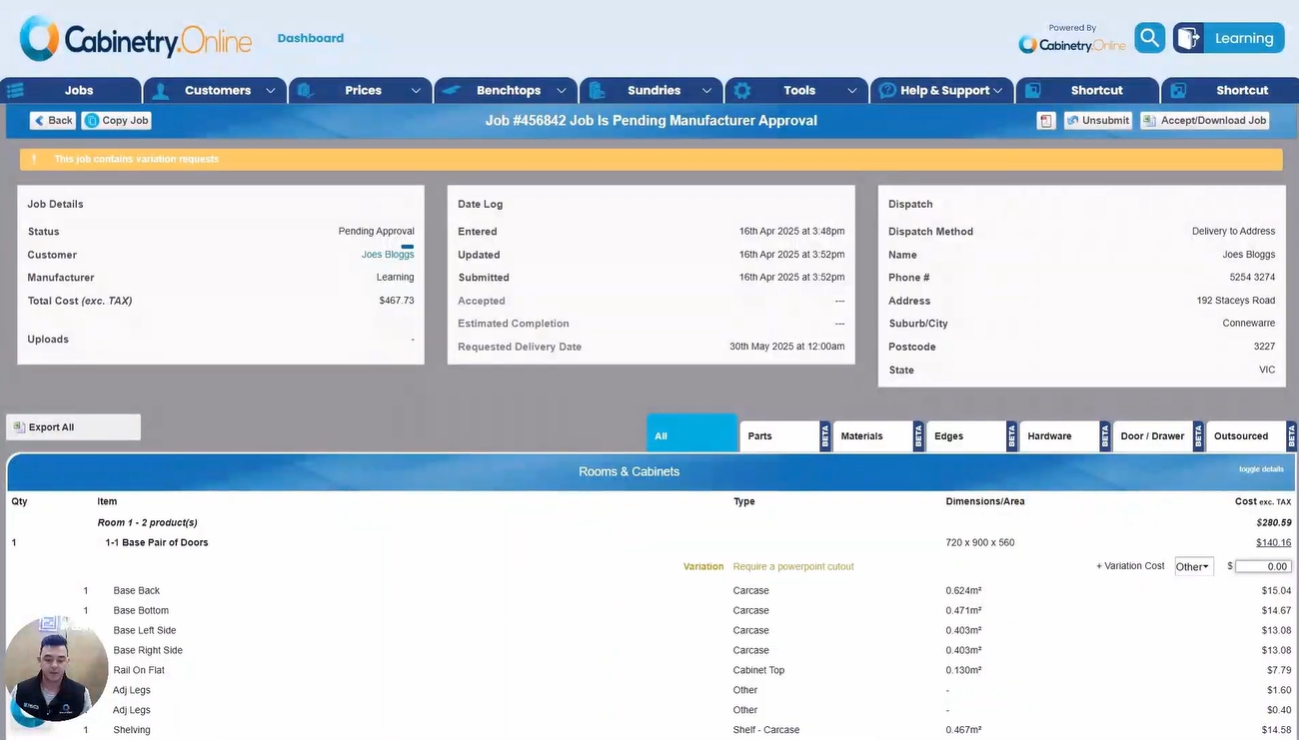
The job report page summarizes cabinetry components, total pricing, customer info, timestamps, and dispatch details. Users can export details, copy the job, download PDFs, make adjustments, or accept and download it for manufacturing. The interface features tabs for parts, materials, edges, hardware, doors/drawers, and outsourced items, highlighting special requests like variations or assembly while calculating usage metrics (square meters/linear meters) and minimum fee triggers.
- Job Details & Customer Info: Displays a breakdown of cabinetry, component pricing, customer details, key job dates (entered, updated, submitted), and dispatch details including delivery address.
- Export & Job Management Actions: Users can export a list of all products and components using the "Export All" button. Users can also copy the job to any account, generate a job PDF, unsubmit it for edits, or click "Accept and Download Job" to send it to manufacturing.
- Variations and Assembly: Visual notifications flag if a job requires assembly or variation requests. Specific products with variation requests allow manual variation cost adjustments.
- Component Pricing Tabs: Configured pricing is broken down across dedicated tabs for Parts, Materials, Edges, Hardware, Doors and Drawers, and Outsourced materials.
- Usage & Fee Summaries: The bottom of the page displays material usage breakdowns and any applied minimum usage fees, with a "More Information" option to identify the exact product triggering a fee.
Click the below image:
Was this article helpful?
That’s Great!
Thank you for your feedback
Sorry! We couldn't be helpful
Thank you for your feedback
Feedback sent
We appreciate your effort and will try to fix the article